
Here's what's new
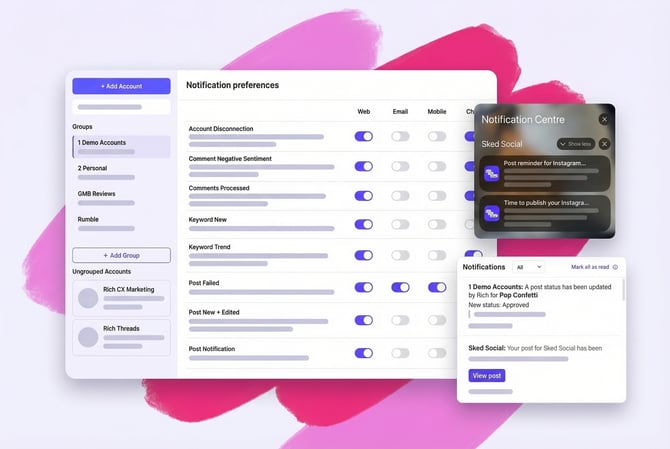
Brand new alert types can now reach you across four channels: your in-app feed, email, mobile push, and chat via Slack or Microsoft Teams. Use one or mix and match based on how your team works.
10+ new ways to stay in the loop
.png?width=670&height=425&name=image%20(117).png)
We’ve expanded what you can track so you only get the alerts that move the needle for your team. New notification types include:
- Negative Sentiment: Get alerted when a comment needs a pivot or a fast response.
- Social Listening Trends: Know the second a tracked keyword starts blowing up.
- Account Disconnections: Instant alerts if an account needs a quick reconnect.
- Idea Assignments: See exactly when a teammate tags you in a new concept.
- Post Status Approvals: Track the moment a client approves or returns a post for changes.
- Read the full getting started guide for the full list of updated notifications
How does it work?
We've set up two levels of notifications to match how Sked is actually used.
User notifications cover the things that involve you directly: someone mentioning you in a teamwork comment, or assigning you an idea.
Group notifications cover what's happening across the social accounts you manage: posts going out, posts failing, keywords moving, approvals changing status.
We've already set sensible defaults for everyone, so you'll start seeing the most important alerts straight away. And if you want to tune things further with more channels, more notification types, per-group controls – it's all there when you need it.
If your team lives in Slack or Teams, your notifications can too. Connect and route alerts directly to the channels where your team already works. Post updates, change requests, new keywords in Social Listening, they show up where someone will actually see them, not buried deep in an inbox.
.png?width=670&height=449&name=image%20(115).png)
A couple of ways teams Slack or Teams:
- Client approvals: route Post Status Approvals to a shared Slack channel so your whole team has visibility when a client approves or requests changes. No more chasing for updates or missing a sign-off.
- Publishing updates: add Post Sent to a quiet channel and get a steady, low-noise feed of content going live. You'll always know what's published without it demanding your attention.
Why this matters
Most notification systems either tell you nothing or tell you everything. We've designed this one around the decisions social media managers actually need to make: did that post go out, does something need attention, is a keyword blowing up, does a post need my approval?
The defaults get you to useful straight away, and the group-level controls mean you can tune it per client or account set without it becoming a full-time job.
Get set up
Connect Slack or Teams, check your preferences, and start receiving notifications in the channels that work for you.
Set up notifications →
Read the full guide on the updated notifications