
Overview
Alt text helps make your social content accessible to people using screen readers, and is a requirement for many enterprise and government organisations meeting WCAG accessibility standards.
AI alt text generation is available on all Sked plans.
Prerequisites
- You must have at least one image attached to your post
- AI alt text generation does not apply to video attachments or text-only posts
- Generation is available within the post composer only — it is not available from the media library
How to use AI-generated alt text
- Open the post composer and attach an image to your post.
- In the Other post information section, look for the Add alt text link. You'll see a small sparkle (✨) icon next to it — this indicates AI generation is available.
- Click Add alt text.
- Sked will analyse your image and automatically suggest descriptive alt text. A spinner will appear briefly while it generates.
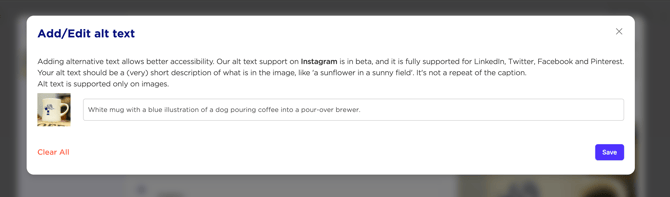
- Review the suggested text. You can:
- Accept it as-is by clicking Save
- Edit it by typing in the field before saving
- Clear it by deleting the prefill and write your own from scratch
- Click Save to apply the alt text to your post.
Note: If you click Edit alt text and there is already alt text saved for the post, the modal will open showing the existing text. AI generation will not run again — edit the existing text directly.
What happens with multiple images?
If you have multiple images attached to your post, AI generation will analyse the first image only. This is a platform limitation where Alt text is not supported for carousel style media.
Troubleshooting
The sparkle icon isn't showing
The AI icon only appears when an image is attached to your post. It won't appear for video attachments or posts with no media.
I see a "Couldn't generate alt text" message
This means the AI generation encountered an error (this can be caused by a timeout, network issue, or a problem with the image). The alt text field will remain empty and editable — you can write your own alt text manually and save it.
The suggested alt text isn't quite right
AI-generated alt text is a suggestion - you're always in control. Click into the field, edit the text, and save your updated version.
Alt text isn't available for my post
Alt text is available for image posts only. If you're publishing a video or a text-only post, the alt text option won't appear.