
What are annotations?
Annotations are a way to leave more detailed feedback. Allowing you to highlight specific elements within media or captions. Instead of describing where something is, you point at it, and the person who made the content sees exactly what you mean.
There are two types:
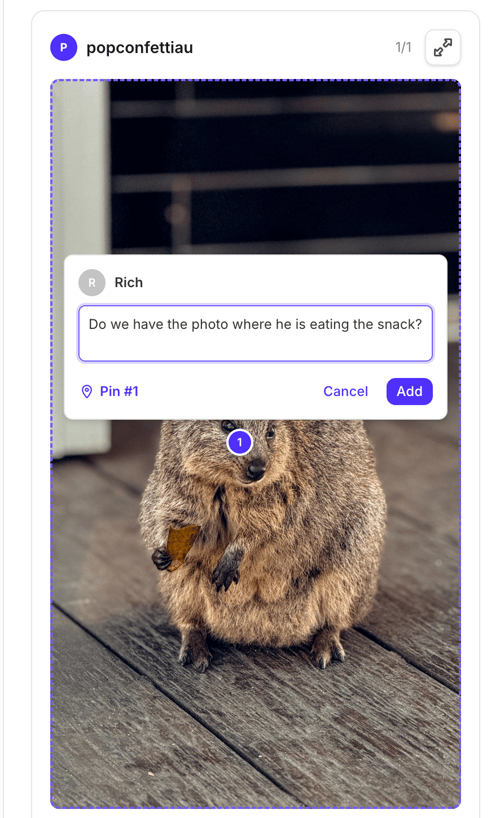
- Pins. Click a spot on an image or video to drop a numbered pin, then add a comment to it.
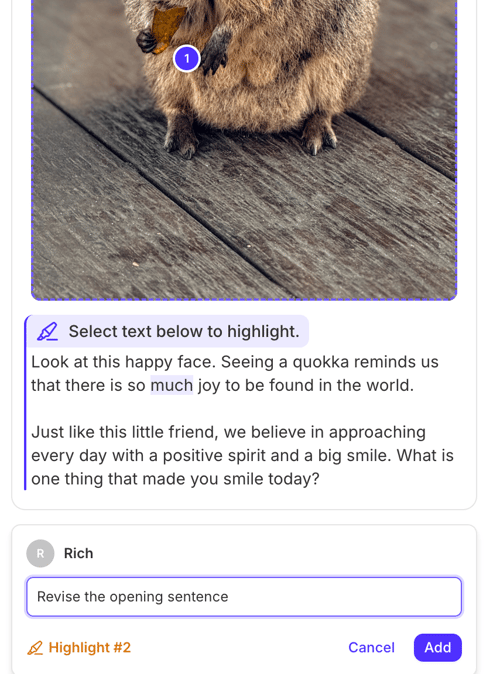
- Highlights. Select text in a caption to highlight it, then add a comment to it.
Annotations make feedback faster and clearer. Your team gets comments tied to the exact element they refer to, so there's less back and forth and fewer "which bit do you mean?" replies.
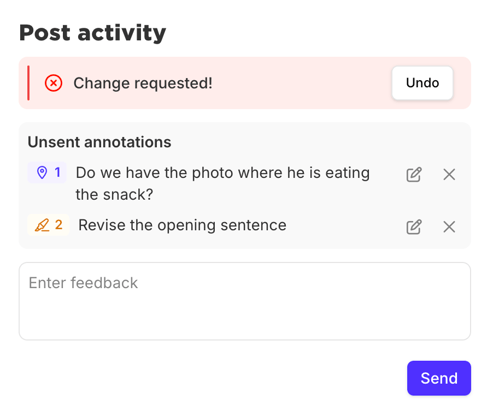
They're optional. Reviewing works exactly as it does today, whether annotations are turned on or not.
A note you can share with your reviewers
Our review links are getting an update on October 14. You'll be able to add annotations when you review content.
Use annotations to give feedback on specific elements within images, video, or captions. Pin a comment to an exact spot, or highlight a few words and comment on them. Instead of describing where something is, you can point at it. That means fewer follow-up questions, less guessing, and feedback that gets actioned the first time.
You don't need to use annotations. Reviewing works exactly as it does today. Open the link, then approve or request changes. There are no new steps, no new sign-ins, and nothing extra to learn. Use annotations when they help and skip them when they don't.
Frequently asked questions
When will the update happen?
On the 15th October 2026, Australian time.
Can I disable annotations?
Yes, you can disable annotations on a per link basis once the update is live.
Where can I read more about annotations?
Our help guide has plenty of supplementary information on how annotations work