
Sked Social offers two approvals add-ons to the Grow plan.
- "Internal approvals" add-on
- "External approvals" add-on, which includes internal approvals
(Note that these cannot be added to the Basic plan and are already included in the Accelerate plan).
Internal approvals add-on inclusions
The internal approvals add-on lets you extend and configure the post statuses that are used inside the dashboard.
Without this add-on, you are limited to only "work in progress" (content that should not be published if it is accidentally scheduled) and "ready to publish".
By adding the internal approvals add-on then you can customise the sequence of statuses, which might for example map to internal team roles (for example a "design ready" status where your graphic designer knows the copy is already created etc).
Here is an example of the internal approvals setup:
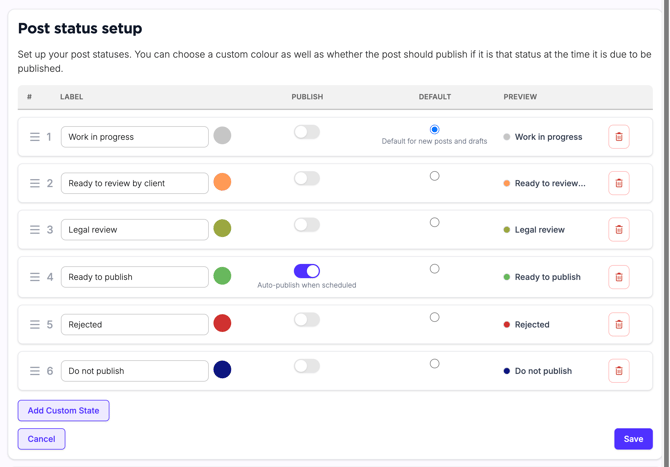
The internal approvals add-on makes these post statuses available to your Sked Social dashboard users. Non-users cannot see the content or change the status of your posts. To enable this functionality (typically used by clients of agencies or stakeholders such as inhouse legal teams), you need the external appprovals add-on.
External approvals add-on inclusions
The external approvals add-on includes all functionality of the internal approvals add-on (ie you can set up your statuses as you wish, add/remove as many as you want).
The External approvals add-on allows you to also create links that are unique to each client/stakeholder which show the posts or drafts in a certain status (such as "Ready for client review") and they can simply click approve/reject and provide comments.
The external user just has a unique link with a secret URL - this makes it easy and foolproof and they do not need to remember a login or learn any of Sked's advanced functionality. This external portal is also mobile friendly.
It also has a grid view for previewing the Instagram grid, and allows the person (if you choose to enable this) to see a calendar view of when the posts will be published.
When the external user approves or rejects a post, you can specify email addresses to be notified so that you know if eg content needs to be actioned from a "Reject with comment" feedback.
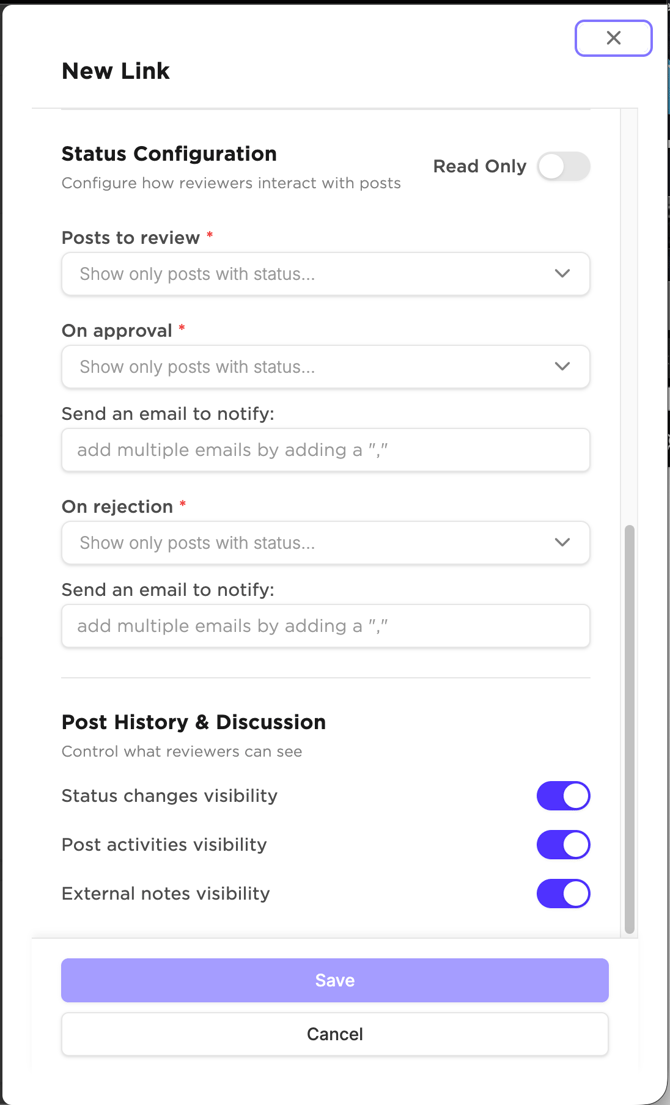
Using this feature you can set up multi-step approval processes using a combination of statuses and URLs - our team would be happy to help you discover the best settings for your workflow.
The review portal for the end-user looks like this:
Read-only calendar
You can also optionally just share a read-only calendar via an external URL (no approve/reject functionality).