
Here's what's new
Duplicate from anywhere
The Duplicate action is now available across every major content surface in Sked:
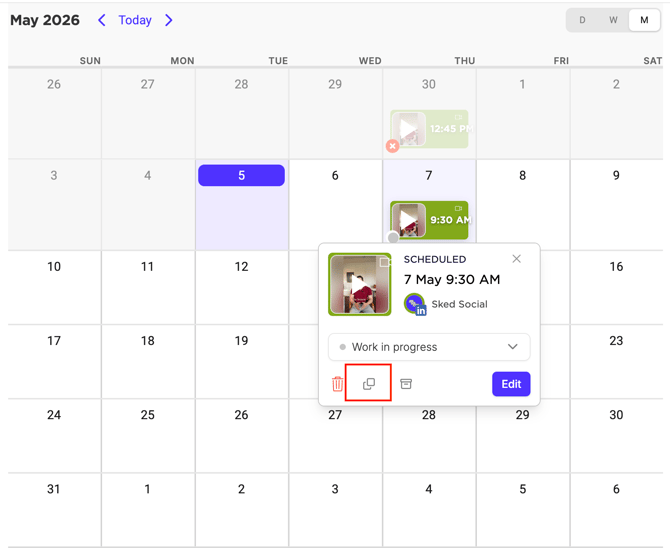
- Upcoming — duplicate a scheduled post and adapt it for a new date
- Drafts — copy a saved draft and build a variation
- Calendar — open the preview panel on any post and duplicate from there
- Archive — works the same as before, just under a consistent label
- Create Post — right-click any tab (saved drafts and scheduled posts included) to duplicate it
Every duplicate opens as a new unsaved draft. The scheduled date and time are always cleared, and the post picks up your workspace's default approval status - so it flows through the right review process before it goes out.
Bulk duplicate up to 20 posts at once
Need to recreate a batch of recurring posts? Multi-select up to 20 posts in Upcoming, Drafts, or Archive and hit Duplicate in the bulk action bar. All selected posts open in Bulk Create as separate new unsaved drafts — ready to review, adjust, and schedule.
Note: Selecting more than 20 posts will disable the Duplicate action. Deselect a few and try again.
One label, everywhere
We've standardised the action name across the product. If you used to see "Post again" in Archive or "Copy to Drafts" — those labels are gone. It's just Duplicate, everywhere.
Why this matters
If you manage recurring events, weekly promotions, or templated content, rebuilding the same post over and over is dead time. Duplicate lets you reuse what's already working — from wherever you happen to be — and get back to the stuff that actually needs your attention.
Try it now
Open any post in Upcoming, Drafts, Calendar, or Archive, or select the overflow menu (⋯) in create Create Post, and choose Duplicate.