
Overview
If your Instagram account is invited to collaborative posts - where another account is the primary author - those posts now appear in Sked Social Insights under their own dedicated section. You can view the same post-level metrics as your owned posts, and include a Top 5 Collaborator Posts page in any Custom Report. Note: Not all metrics are available for every post type
Collaborator post metrics are kept separate from your account-level totals (reach, impressions, engagement) and will not affect your existing Insights data. Collaborator posts also appear in the Labels Table and Bar Graphs, so you can apply Campaign Labels and include them in label-based reporting.
Who this applies to
This feature is available to all Sked Social users with at least one Instagram account connected. You'll only see the Collaborator Posts section if your Instagram account is a collaborator on posts published within your selected time period.
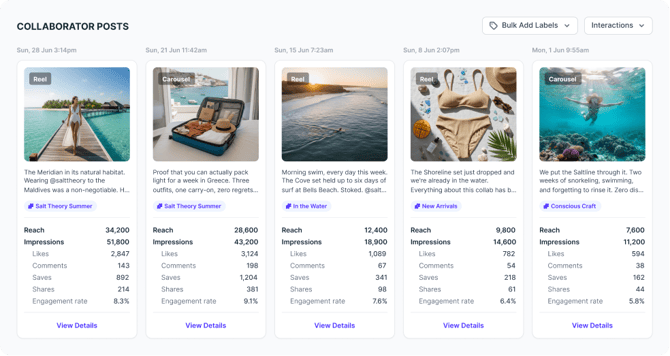
Viewing collaborator posts in the Content tab
- Navigate to Insights in the left navigation.
- Select an Instagram account – open the Brand Summary and click through to an account, or use the account dropdown to select one directly.
- Click the Content tab.
- Scroll down below the Owned Posts section. If your account has collaborated on any Instagram posts, a Collaborator Posts section will appear.
- Each collaborator post displays the same metrics as your owned posts.
- Click any post card to open the full post metrics modal.
- Click the permalink icon on a card to view the post directly on Instagram.
Note: The Collaborator Posts section is hidden if your account has no collaborator posts.
Note: Collaborator post metrics don't include a total vs. organic views breakdown – you'll see total views only. This is because the post is owned by another account.
Applying Campaign Labels to collaborator posts
Collaborator posts appear in the Labels Table and Bar Graph, so you can apply Campaign Labels and Content Pillar labels to them the same way as owned posts. There are two ways to do this.
From a post's details modal:
- Navigate to Insights, open your Instagram account, and click the Content tab.
- Scroll to the Collaborator Posts section and click a post card to open the details modal.
- Click the Labels button in the modal toolbar.
- Select one or more Campaign Labels and/or Content Pillar labels, then click Apply.
From the Content tab (bulk):
- Navigate to Insights, open your Instagram account, and click the Content tab.
- Scroll to the Collaborator Posts section.
- Apply labels directly from the post cards the same way you would for owned posts.
Once labeled, collaborator posts will appear in the Labels Table and Bar Graph under those labels.
Note: Campaign Labels applied to collaborator posts appear in the Insights Labels Table and Bar Graph. In Custom Reports, collaborator posts are included in the brand summary page and have their own dedicated Top 5 Collaborator Posts report page. They are not included in labels-specific report pages.
Adding collaborator posts to a Custom Report
- Navigate to Reports and open or create a Custom Report.
- When adding a new page to the report, select Top 5 Collaborator Posts from the page type options.
- If the connected account has no collaborator posts, this page will appear blank in the report (consistent with other empty report pages).
What counts as a collaborator post?
A collaborator post is an Instagram post where another account invited your connected account as a co-author. You are not the primary author — the post is owned by the account that created and sent the collaboration invite. These posts appear in both accounts' grids on Instagram.
Troubleshooting
I don't see a Collaborator Posts section in my Content Tab.
This section only appears when your connected Instagram account has been invited as a collaborator on Instagram posts. If you haven't been added as a co-author on any posts by another account within the period you have selected, the section won't appear.
My collaborator post metrics look different from what I see in Meta Business Suite.
Sked Social pulls data directly from Meta's API. If there's a discrepancy, it may be due to a data sync delay. Try refreshing Insights or check again after a few hours.
Collaborator post reach isn't included in my account totals.
This is by design. Collaborator post metrics are displayed separately and are not blended into account-level reach, impressions, or engagement totals.
A Campaign Label I applied to a collaborator post isn't showing in the Labels Bar Graph.
There may be a short sync delay after applying a label. Refresh Insights or check again after a few minutes. If the issue persists, contact support.
The Top 5 Collaborator Posts page in my Custom Report is blank.
This means your connected Instagram account has no collaborator posts at the time the report was generated. Once collaborative posts are published, they will appear automatically.