
Overview
Previously, connecting a Meta Business account to Sked would automatically pull in all associated ads accounts. Now you can select only the specific accounts you want Sked to access. Your reporting dashboards and post boosting workflows will only show data from the accounts you choose, and hide accounts you want to keep private.
What's Changed
- Selective ads account access: Choose which of your connected Meta ads accounts are visible in Sked.
- Reporting control: Only selected accounts will appear in your Sked reporting dashboards.
- Post boosting scope: Boosting options will only reflect your selected accounts — no more scrolling through accounts that aren't relevant.
How to Configure Your Ads Account Access
- Go to Settings in your Sked account.
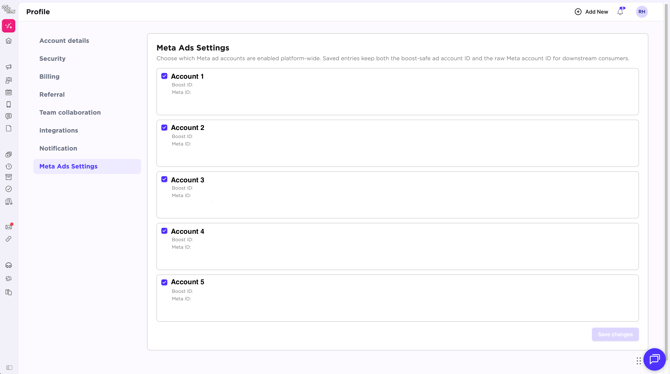
- Select Meta Ad Settings.
- You'll see a list of all ads accounts associated with your Meta Business account.
- Toggle on the accounts you want Sked to use for reporting and post boosting.
- Save your changes. Your reporting and boosting options will update immediately.
Frequently Asked Questions
Will this affect my existing reporting data? No. Historical data is preserved. Changing your account selection affects which accounts are shown going forward, not your past reporting.
Can I add or remove accounts at any time? Yes. You can update your selected ads accounts at any time in Settings. Changes take effect immediately across reporting and post boosting.
What if I don't select any accounts? If no ads accounts are selected, Meta-related features like reporting and post boosting will not display any ads data. Make sure to select at least one account to use these features.
Do all team members see the same accounts? Account selection is managed at the connection level by account admins, team members will only see ad accounts selected in reporting. For post boosting, Ads accounts are linked at a group level, and only directly linked Ad accounts will be displayed.