
The Sked mobile app (iOS and Android) just got a major performance upgrade — rebuilt from the ground up for a lightning-fast experience for scheduling, approving, and a Unified Inbox.
Download it now: iOS App Store · Google Play
Here's what's new (and what it actually means):
Mobile Inbox: Handle Engagement from Anywhere
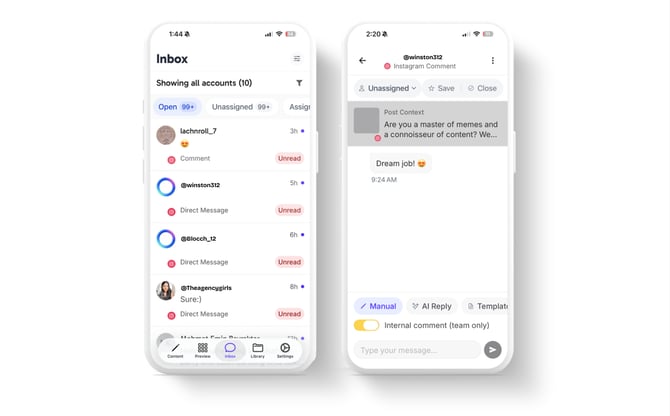
We've brought Sked's powerful Unified Inbox right to your mobile device. That means you don't have to wait until you're back at your desk to jump on important conversations.
- Unified Conversations: Reply to DMs, comments, and reviews for all your connected social accounts in one spot.
- Assign on the Go: Instantly assign a conversation to a teammate for follow-up, keeping your response flow organized wherever you are.
- AI-Powered Replies: Speed up your response time with smart, suggested replies leveraged by on-device AI technology (available on compatible iOS devices). Just tap, check, and send.
Quick Scheduling & Visual Planning
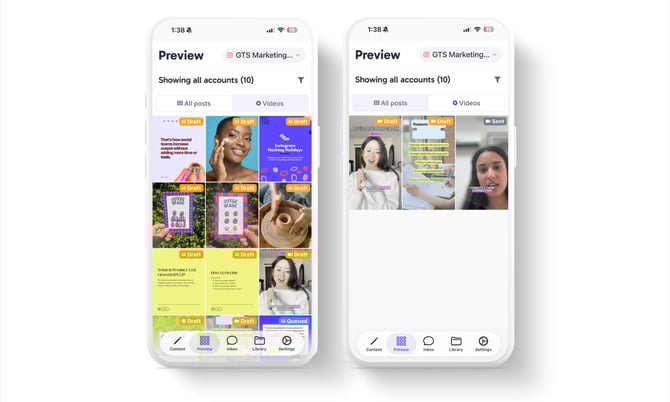
This is the fastest way to make last-minute post edits or check your calendar when you're out.
- Fast Content Creation: Create, edit, and manage posts for all supported platforms straight from your phone.
- Visual Planner: Drag-and-drop to perfect your Instagram grid, and get accurate, multi-platform previews—including 4:5 images and 9:16 vertical videos for TikTok and YouTube.
- Always-Available Drafts: Save a post as a draft on your device and pick it up later on desktop (or vice versa).
Better Collaboration, Zero Chaos
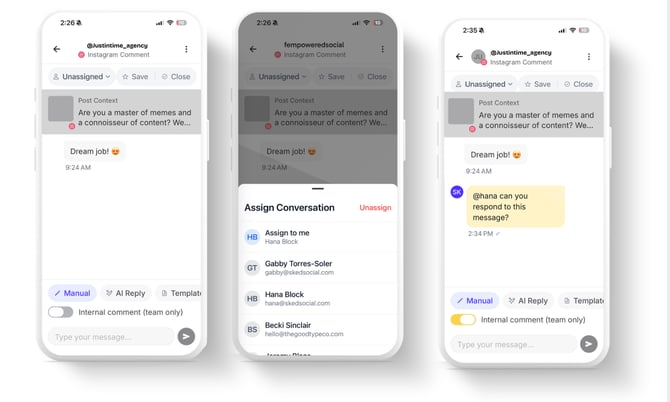
We've supercharged collaboration so your team stays in the loop wherever they are.
- Granular Alerts: Get pinged immediately for approvals you need to make, when a teammate mentions you in a post note, or if a post fails. (Not just for publishing anymore.)
- Instant Approvals: Review and approve pending content right in the app, keeping your workflow running smoothly.
- Team Mentions in Notes: Mention a team member in a post note right from the editor to get their feedback fast.
- Media Management: Upload files and manage your asset collections directly into the Sked Media Library from your camera roll.
Coming Soon:
Share items directly from anywhere on your iOS or Android device to your Ideas pad to pick up later.
Why This Matters
The social game doesn't wait for you to get back to the office, and frankly, neither should your tools. This new app is your reliable, fast, and powerful remote control for Sked.
It's purpose-built for those critical, on-the-go moments:
- Kill the last-minute stress. Edit your caption or swap a photo in seconds—no laptop required.
- Handle engagement instantly. The mobile Unified Inbox and new notifications ensure you can jump on reviews, DMs, or crisis comments instantly, protecting your brand reputation and boosting your response rate. Plus, you can assign it before you even get back to your desk.
- Keep the calendar flowing. Approvals won't stall your content because you can action them right from your phone.
It’s designed to be the essential companion that keeps your entire content workflow running smoothly, efficiently, and beautifully—all while you're away from your desk.
Ready to try it? You can download the app here in the iOS App Store and Google Play stores.