
Certain post types cannot be published automatically but you can still schedule your content, and then manually publish it. When a post is scheduled for manual publishing, Sked will send a push notification at the scheduled time so you can finish publishing it in the native app.
Manual publishing is commonly used for:
- Instagram Stories: By default, Sked publishes Instagram Stories automatically but you can opt to post manually as well.
-
The most common reason to publish manually is so that you can add polls, hashtags, mentions or other interactive elements to the story like you would in the Instagram app.
-
-
Instagram Reels: By default, Sked publishes Instagram Reels automatically but you can opt to post manually as well.
-
You may choose to manually post to add something like trending audio.
-
- TikTok: By default, Sked publishes TikTok posts automatically, but you can opt to post manually as well.
- You may choose to manually post to add something like trending audio.
- Snapchat
- Any other apps you'd want to connect
How it works
First before creating your posts for manual publishing, you need to make sure you:
Once the two above have been set up, you are now ready for:
Step 3: Creating posts for manual publishing
When you're uploading your content,
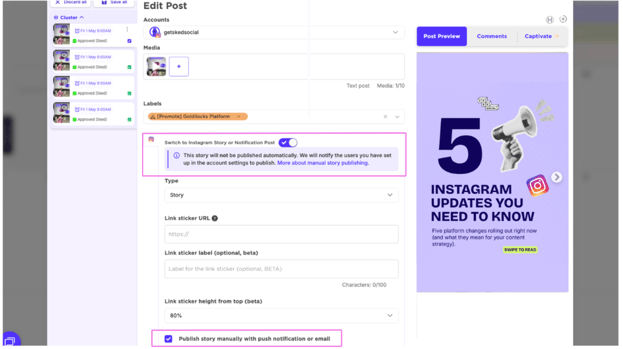
To schedule posts to be manually posted, be sure to toggle on Notification Post button and select the content type from the dropdown.
-
For manually story publishing, simply check the box labelled 'Publish story manually' or "switch to notification post" to choose to publish it manually rather than have Sked post it automatically.
-
You can add information that will be displayed in the Sked Social mobile app under 'Notes for manual publishing'. This is a useful place to include reminders about the accounts or location you want to tag, or the stickers you'd like to use.
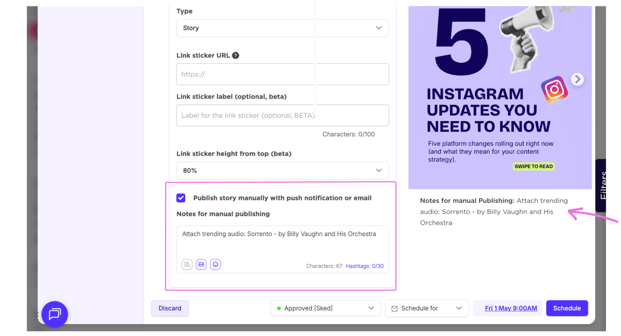
Note: Posts set to publish manually will be listed in upcoming posts with a notice that they are set to be manually published
When it's time to post
When it's time to post, the users specified in account settings will get a push notification on their phone telling them that it's time to post.
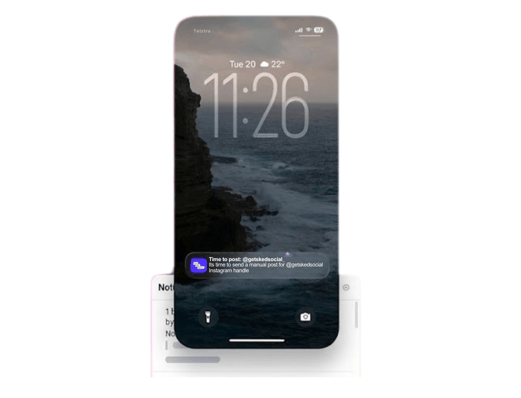
Simply open the notification, and the Sked app will open to the appropriate content.
Click the button and Sked will download the assets to your device and then open the specified app. You can then create and publish the content.
Need help setting up your mobile manual publishing notifications?
For full instructions, see:
[Manual publishing notifications when using the updated Mobile App]