
An important note before we start - An invited user/collaborator must have accepted their invite before you can modify their permissions
The users permissions page:

Managing other users:
-
They can modify permissions for all users on your account, including social account visibility and user management
-
They cannot remove an Administrator for security reasons
Inbox access:
-
They can manage messages, mentions, tags, comments, and reviews in the Sked inbox for their granted accounts
-
Currently, it's not possible to grant permission exclusively for the Inbox; however, this may change in future updates
Paid Social Reporting:
- Can view performance metrics and analytics for paid social campaigns across connected accounts
- Can export paid social reports for internal review and analysis
Adding accounts:
-
Any user can reconnect accounts they can access
-
Access to a profile with Business Manager admin privileges is necessary for Facebook and Instagram
-
For other platforms, sign-in with the respective platform credentials is required
-
Only administrators can remove accounts for security reasons
Control Access to Library collections:
-
Beneficial for client collaboration without revealing your entire library
-
Use the checkbox and dropdown to specify their collection access
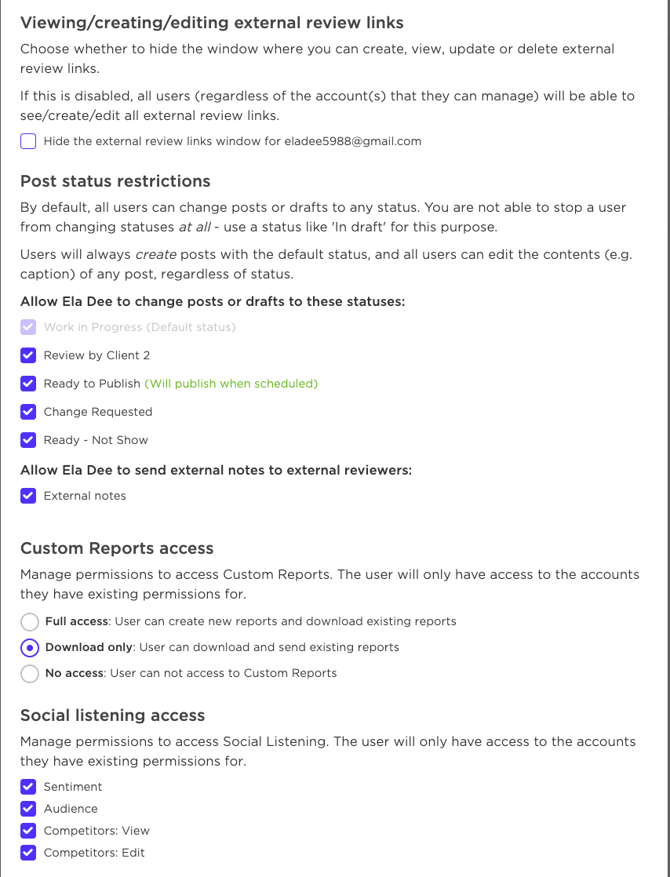
Viewing external review links/post status restrictions:
-
This restricts viewing, editing, or deleting external review links
-
Ideal when clients are invited to Sked for post management
- Post Status Restrictions: Allows you to limit post statuses for each user. A good example would be team members who shouldn't have approval privileges; this can be hidden so no mistakes are made and unapproved content goes live.
Custom Reports access:
- Can create, view, and edit custom reports using available data sources and metrics
- Download only or no access at all
Social listening access:
• Can view sentiment analysis, engagement trends and competitors from listening data