
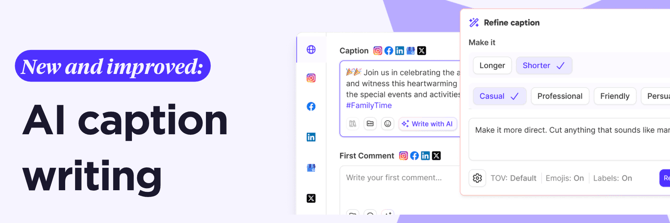
We've built AI caption writing directly into Create Post. No switching tabs, no copy-pasting from a separate tool, no generic output that sounds like everyone else's brand. Just a Write with AI button in the caption or first comment field, ready when you need it.
Here's how it works: click Write with AI, type a prompt (even just a few words about what the post is about) and hit go. The AI generates a caption grounded in your brand kit. Your tone of voice, your brand description, your content labels. The output sounds like you because it's built from you.
And if the first pass isn't quite right? That's what Refine is for. Make it shorter. Make it more casual. Change the tone. Add your own instruction in plain text. Or hit Try Again and get a different take from the same brief. When you want to wipe the slate and start over, Start Fresh resets the flow without losing your original prompt.
There's also Translate. Pick a language, get a version in that language without starting from scratch.
The settings panel lets you choose which tone of voice profile to use, whether to include emojis in the output, and whether to pull in your selected content labels to guide the AI toward your content pillars or campaigns.
It's available to everyone on Sked Social, right now. Open Create Post, click Write with AI in the caption or first comment field, and see what it does with your next brief.